There are over 3,600 stocks trading on U.S. exchanges alone. Trying to manually sort through all of them before the market moves is a losing battle. The smartest retail investors and day traders have figured out a better way: use stock scanner alongside investing app tools to cut through the noise fast. A scanner narrows your universe down to real candidates. Your investing app helps you monitor, time, and execute. Together, they form a workflow that is faster, sharper, and far less stressful than going it alone.
Table of Contents
- Key Takeaways
- How to use stock scanner alongside investing app
- A step-by-step workflow that actually works
- Common mistakes when combining these tools
- Real benefits of integrating these tools
- My take on scanners, apps, and where most traders go wrong
- Try Ai-stockscout for free today
- FAQ
Key Takeaways
| Point | Details |
|---|---|
| Scanners narrow the field | Effective screening cuts 3,600+ stocks down to 10-50 tickers in under 60 seconds. |
| Screeners vs. scanners differ | Static screeners filter historical data; real-time scanners track live market events for active trading. |
| Two-step workflow wins | Use a scanner first for broad filtering, then shift to your investing app for timing and execution. |
| AI is changing the game | Modern investing app features now include AI-driven discovery that automates watchlist updates and reduces manual work. |
| Avoid signal-only trading | Scanner results must be validated with news, filings, and market context before you act. |
How to use stock scanner alongside investing app
Before you can build a workflow, you need to understand what each tool actually does. They are not interchangeable, and confusing them is one of the most common mistakes retail investors make.
Stock screeners vs. stock scanners
A stock screener is a filter. You set criteria like P/E ratio, market cap, or dividend yield, and it returns a list of stocks that match. The data is mostly static. It reflects what was true at the last data refresh, not necessarily what is happening right now. Static screeners filter historical data, which makes them useful for swing traders and long-term investors but unreliable for active day trading.
A stock scanner is different. It monitors the market in real time and fires alerts when stocks hit your criteria. Volume spikes, price breakouts, unusual options activity. Day traders rely on scanners to find trade candidates matching technical setups the moment they form. That speed is the whole point.
What to look for in each tool
Here is what separates useful tools from ones that waste your time:
Stock scanner must-haves:
- Real-time data with minimal delay
- Customizable filters for price, volume, momentum, and technical patterns
- Live alerts via email, SMS, or push notification
- AI integration for pattern recognition and signal scoring
Investing app must-haves:
- Portfolio tracking with live price updates
- Watchlist management with notes and alerts
- AI-powered discovery or screening built in
- Clean charting and order execution in one place
Free screeners like Finviz and Yahoo Finance cover most retail investor needs well. Premium tools with real-time APIs serve advanced traders who need execution-grade speed. The right choice depends entirely on your trading style.
The best setup pairs a dedicated scanner for discovery with an investing app for everything that happens after the signal fires.
| Tool Type | Best For | Data Speed | Key Strength |
|---|---|---|---|
| Static screener | Swing and long-term investors | Delayed | Deep fundamental filtering |
| Real-time scanner | Day traders and active traders | Live | Instant alerts on price and volume |
| AI investing app | All investor types | Live | Automated watchlists and discovery |
A step-by-step workflow that actually works
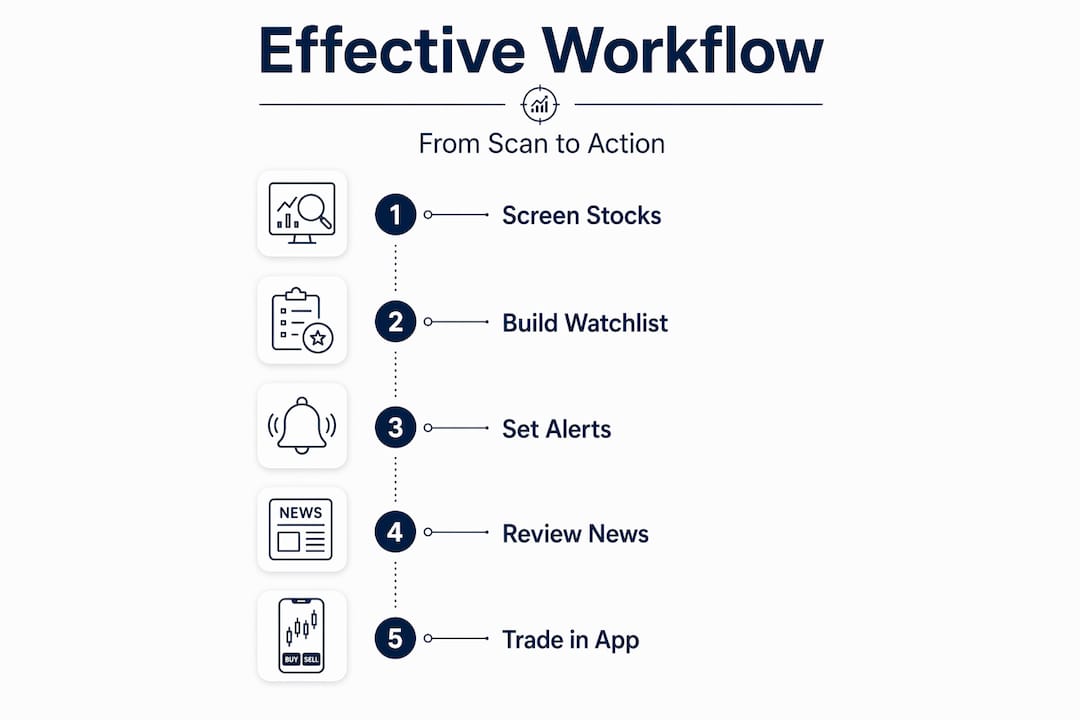
Knowing the tools is one thing. Using them together without getting overwhelmed is another. Here is a clean, repeatable process you can follow every trading day.
-
Run your scanner before the open. Set your filters the night before or during pre-market hours. Focus on criteria that match your strategy: gap-ups above 3%, volume 2x the 30-day average, or stocks breaking above key resistance levels. Let the scanner do the heavy lifting.
-
Build your watchlist from the results. Take the top 10 to 30 tickers your scanner surfaces and move them into your investing app. Do not just dump them in. Add a quick note on why each stock made the cut. This forces you to think before you act.
-
Use your investing app to monitor and time entries. Your scanner found the candidates. Your app now tells you when to move. Watch for confirmation signals: price holding above a key level, volume continuing to build, or a catalyst like news or an earnings revision.
-
Activate AI features for dynamic updates. AI-powered investing apps can automate watchlist updates and flag new developments without you refreshing manually. Use these features. They reduce the cognitive load of tracking 20 stocks at once.
-
Set alerts, then step back. Configure price and volume alerts in your investing app for every stock on your watchlist. You do not need to stare at charts all day. Let the alerts bring you back when something worth watching actually happens.
-
Review and reset after the close. Remove stocks that played out or failed to move. Run your scanner again for the next session. The workflow resets daily.
Pro Tip: Do not add more than 30 stocks to your daily watchlist. More than that and you stop actually watching any of them. Quality over quantity wins every time.
The two-step approach, broad filtering first and then focused monitoring, is the method that separates disciplined traders from reactive ones. Best practice starts with broad market filtering, then shifts to timing and execution inside your app.

Common mistakes when combining these tools
Even traders who understand both tools separately can run into problems when they try to combine them. These are the mistakes worth knowing before you make them.
Treating scanner signals as buy signals. A scanner tells you a stock might be worth watching. It does not tell you to buy. Relying solely on screener buy signals without checking news, company filings, and broader market trends is one of the most costly mistakes retail investors make. Validate every result.
Using a static screener for day trading. If you are trying to trade intraday moves with a screener that refreshes data once a day, you are working with stale information. Static screeners are ineffective for active trading due to data latency. Match your tool to your time frame.
Ignoring sync and data delay issues. Not all investing apps pull live data at the same speed. If your scanner fires an alert and your app is showing prices that are 15 minutes old, you could be entering a trade based on a setup that no longer exists. Check your app's data feed settings.
Letting your watchlist grow unchecked. Adding every scanner result to your app without pruning creates noise. A 200-stock watchlist is not a strategy. It is a distraction.
Skipping the news check. A stock can look perfect on a scanner and still be a trap. Earnings warnings, FDA decisions, and macro events do not show up in technical filters. Always cross-reference scanner results with current news before committing capital.
Pro Tip: Before acting on any scanner result, open the stock in your investing app and check the most recent news headline. Thirty seconds of context can save you from walking into a bad trade.
Real benefits of integrating these tools
When you combine stock market analysis tools correctly, the results are measurable. Here is what you can realistically expect from a well-built workflow.
| Benefit | Without Integration | With Integration |
|---|---|---|
| Time to build a watchlist | 2 to 4 hours of manual research | Under 60 seconds with scanner filters |
| Stocks reviewed daily | 20 to 50 manually | 3,600+ filtered automatically |
| Alert response time | Delayed, manual monitoring | Instant push notifications |
| Portfolio oversight | Fragmented across tools | Centralized in one investing app |
| Decision confidence | Based on gut and partial data | Backed by real-time data and AI signals |
The time savings alone justify the setup. Combining scanners with apps cuts decision time from hours to under 60 seconds. For active traders, that speed difference is the difference between catching a move and reading about it after the fact.
Modern investing apps with AI features are also closing the gap between discovery and execution. Features like AI-generated asset tracking and prompt-driven screening mean you can manage a focused portfolio without jumping between five different platforms. That kind of efficiency used to require professional-grade infrastructure. Now it is available to any retail investor willing to set it up.
My take on scanners, apps, and where most traders go wrong
I've watched retail investors make the same mistake for years. They find a scanner they like, get excited about the signals, and start trading every result that comes through. Within a few weeks, they are frustrated because the win rate is lower than expected. The scanner did not fail them. Their workflow did.
What I've learned is that the scanner is only as good as the process around it. Real-time data matters, yes. But so does knowing when to ignore a signal. In 2026, the tools are better than ever. AI-powered discovery, automated alerts, integrated charting. The technology is not the bottleneck anymore. Discipline is.
The traders I've seen succeed with this approach treat their scanner as a filter and their investing app as a decision environment. The scanner surfaces candidates. The app is where they think. They check the chart, read the news, look at the broader sector, and only then decide. That qualitative layer is what separates traders who last from those who burn out chasing signals.
My honest advice: start with a tight filter set. Five to seven criteria max. Get your watchlist down to 15 to 20 stocks. Build the habit of reviewing each one in your app before the market opens. Do that consistently for 30 days and you will feel the difference. The goal is not more signals. It is better decisions per signal.
— Philip
Try Ai-stockscout for free today
If you want to put this workflow into practice without paying for five separate tools, Ai-stockscout was built for exactly this.
Ai-stockscout combines AI-powered stock scanning, real-time alerts, insider and dark pool data, and watchlist management in one place. You get a free plan with real tools, not just a demo. The Pro upgrade costs a fraction of what traditional scanning platforms charge, and you can try it free for 3 days with no commitment. No complicated setup. No bloated interface. Just fast, focused market intelligence that works the way your workflow actually should. Start your free trial and see how much faster your research gets.
FAQ
What does it mean to use a stock scanner alongside an investing app?
It means using a scanner to filter thousands of stocks down to a short watchlist, then monitoring and executing trades on those picks inside your investing app. The two tools handle different parts of the same workflow.
What is the difference between a stock screener and a stock scanner?
A screener filters stocks based on static data like fundamentals or technicals. A scanner monitors the market in real time and sends alerts when stocks hit your criteria. Day traders need scanners; long-term investors can often rely on screeners.
How many stocks should be on my watchlist after scanning?
Most experienced traders keep their active watchlist between 10 and 30 stocks. Effective screening narrows 3,600+ tickers to a manageable set, and keeping that list tight helps you focus on quality setups rather than chasing every signal.
Can I use a free stock scanner for day trading?
Free scanners can work for swing trading, but active day traders typically need real-time data feeds. Free tools like Finviz are solid for research and screening, while real-time scanners are better suited for intraday execution.
Do investing apps replace the need for a separate scanner?
Not entirely. AI features in investing apps are closing the gap, but dedicated scanners still offer deeper filter customization and faster alerts. The best setup uses both in the two-step workflow described above.