
Most people assume mobile trading apps are glorified stock tickers. You open the app, check your portfolio, maybe glance at a chart, and close it. That mental model is costing you real money. Understanding how mobile trading apps work reveals a completely different picture: real-time data pipelines, intelligent order routing, layered security systems, and execution speeds measured in milliseconds. This guide breaks down exactly how these apps function under the hood, what features actually matter, and how to use them to trade smarter starting today.
Table of Contents
- Key takeaways
- How mobile trading apps work under the hood
- Core features every trader should know
- Mobile app types and their tradeoffs
- How to use trading apps effectively and safely
- My honest take on mobile trading apps
- Take your trading further with Ai-stockscout
- FAQ
Key takeaways
| Point | Details |
|---|---|
| Real-time data is not instant by default | Apps use WebSocket connections to push market data in under 100ms, but network conditions affect this. |
| Order routing is automated and smart | Your trade is evaluated across multiple venues for price, speed, and fees before execution. |
| Mobile apps have real security layers | Biometric login and multi-factor authentication protect your account at the transaction level. |
| Mobile complements desktop, not replaces it | Use mobile for monitoring and quick trades; rely on desktop for complex strategy work. |
| Features vary widely between apps | Always verify supported order types and security settings before committing real funds. |
How mobile trading apps work under the hood
The biggest misconception about mobile trading apps is that they are simple front ends connected to a database. They are not. The technology running behind your screen is closer to what powers financial exchanges than what powers a typical smartphone app.
Real-time data delivery
When you watch a stock price update live on your phone, that data travels through a WebSocket connection. Unlike older polling methods where your app asked the server "anything new?" every few seconds, WebSockets keep a persistent, two-way channel open. The server pushes updates to you the moment they happen. High-performing trading apps target data delivery under 100 milliseconds and 99.99% uptime while handling traffic spikes exceeding 1,000% of normal load. That last stat matters most during earnings announcements or market crashes, exactly when you need your app to work.
Order execution flow
When you tap "Buy," a specific sequence fires off. You select an asset, choose an order type, and confirm the trade, which the app then routes to market makers or exchanges for execution. The order passes through an Order Management System that tracks every state change: created, validated, submitted, filled, or rejected. Nothing skips a step.
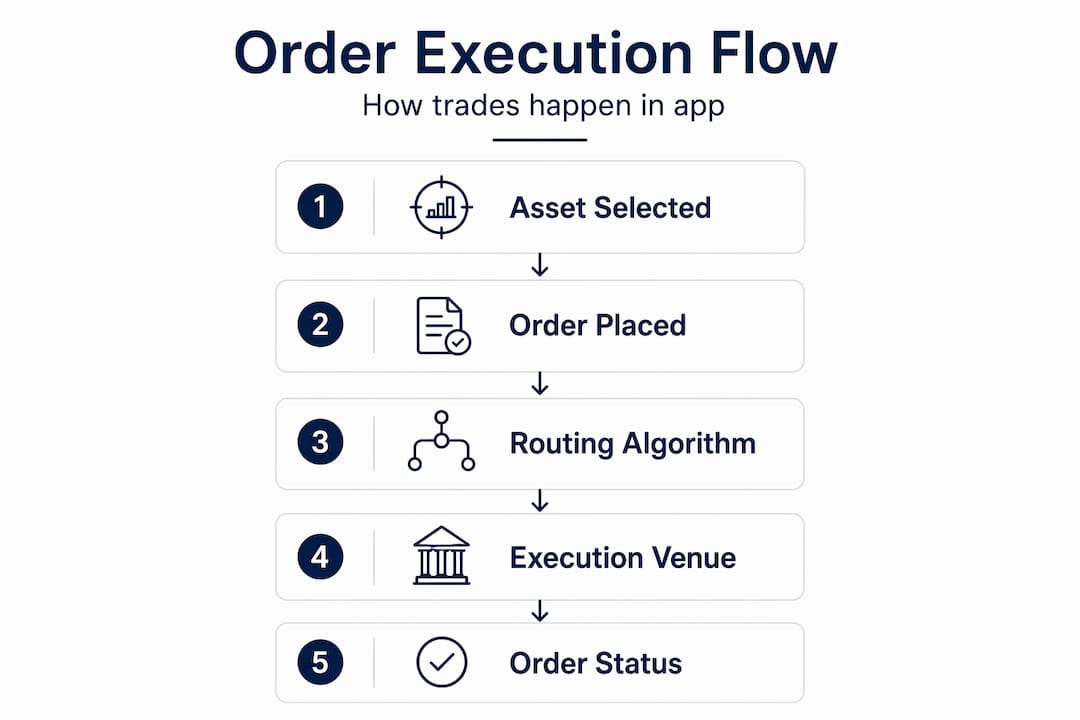
The routing decision is not random. Smart Order Routing algorithms evaluate execution venues based on price, fill rates, latency, and fees simultaneously. Your app is running a small optimization calculation every time you place a trade, finding the best available outcome across multiple venues in real time.
Pro Tip: If your app lets you see order status updates (pending, partially filled, fully filled), you are watching the Order Management System in action. This transparency is a sign of a well-built platform.
Core features every trader should know
Mobile trading apps have evolved well beyond basic buy and sell buttons. The features available today give retail traders access to tools that were once exclusive to institutional desks.
Order types that protect your trades
Understanding order types is non-negotiable for anyone trading actively:
- Market orders execute immediately at the best available price. Fast, but you accept whatever price the market gives you.
- Limit orders set the maximum price you will pay (or minimum you will accept to sell). Your order only fills if the market reaches your price.
- Stop-loss orders automatically sell a position when it drops to a set price, capping your downside without you watching the screen.
- Trailing stops move your stop price up as a stock rises, locking in gains dynamically. This is one of the most underused tools by beginners.
Many all-in-one apps designed for passive investing do not support advanced order types needed for active trading risk management. Check this before you deposit.
Charts, alerts, and watchlists
Real-time charts with technical indicators, multi-timeframe views, and drawing tools are standard on serious trading apps. You can analyze a stock on a 5-minute chart for a day trade and switch to a weekly view to check the bigger trend without leaving the app.
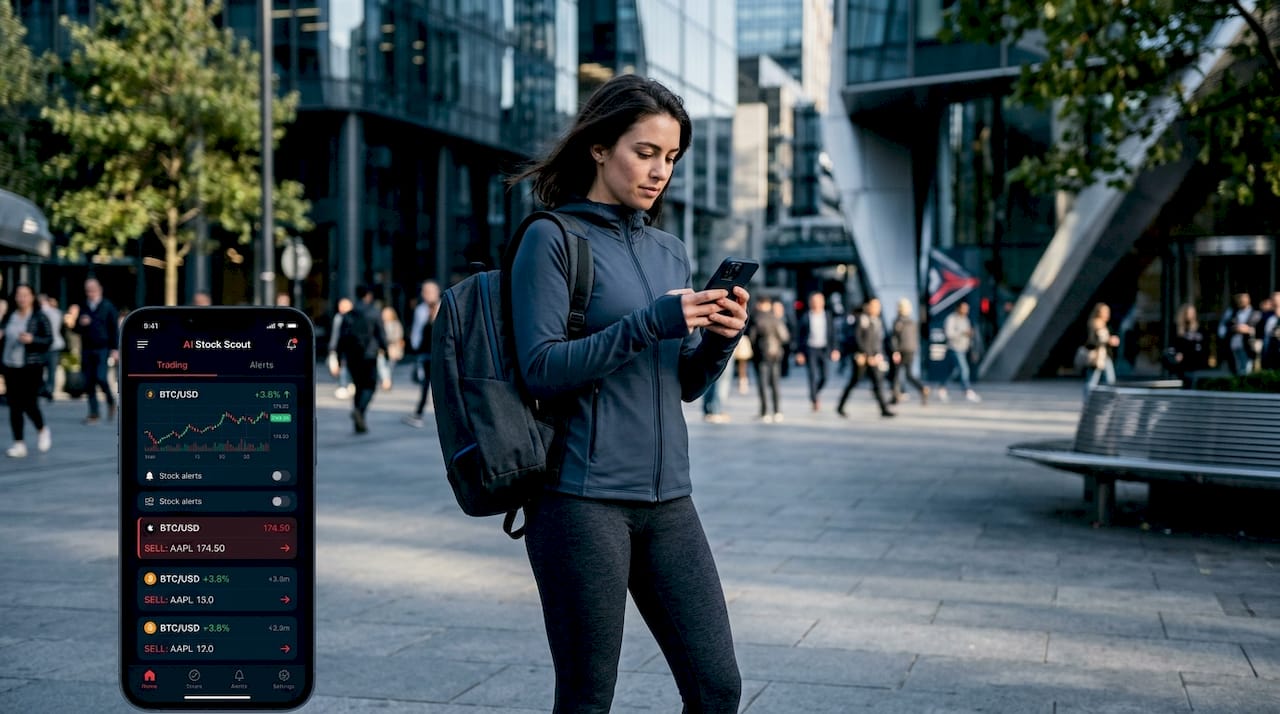
Alerts and watchlists that sync across your devices are equally critical. Set a price alert once on your phone, and it fires whether you are on mobile or desktop. This eliminates the need to stare at screens all day.
Security that actually works
Multi-factor authentication including biometrics adds a critical layer of security for sensitive app operations. The best apps gate actual transactions behind biometric confirmation, meaning even if someone gets past your password, they cannot execute trades without your fingerprint or face scan.
Pro Tip: Enable MFA on every trading account you own, not just your brokerage. Your email account is the recovery key to everything. If it gets compromised, every financial account linked to it is at risk.
Paper trading for beginners
Demo accounts and paper trading modes let you practice with simulated money using real market data. This is the single most underused feature by new traders. You learn how order types behave, how fast fills happen, and how your strategy performs without any financial risk. Experts consistently advise beginners to treat mobile apps as extensions of larger strategies, prioritizing educational features first.
Mobile app types and their tradeoffs
Not all mobile trading experiences are the same. There are three distinct modalities, and knowing which to use when makes a real difference.
| App Type | Strengths | Weaknesses | Best For |
|---|---|---|---|
| Native mobile app | Biometric security, reliable push notifications, portfolio access | May lack advanced execution features | Monitoring, quick trades, beginners |
| Mobile web terminal | Deep analytics, modular interface, no download required | Weaker notifications, session management issues | Research, intermediate analysis |
| Telegram-based bot | Fast execution, pseudonymous, no app store required | Limited interface depth, session security concerns | Speed-focused crypto traders |
Native mobile trading apps excel in biometric authentication and notification reliability but may lack advanced execution features required by professional traders. On the other end, Telegram-native trading bots offer fast execution and pseudonymity but have session security limitations worth understanding before you use them.
Mobile web terminals sit in the middle. They provide powerful analytics but suffer from notification reliability and session management issues. Many active traders use a combination: native app for alerts and quick executions, web terminal for deeper pre-trade analysis.
The honest reality is that mobile apps often do not fully replace desktop trading due to screen size and latency constraints. They serve as monitoring and reaction tools. For building complex multi-leg strategies or running detailed scans, a desktop setup still wins.
How to use trading apps effectively and safely
Knowing how mobile trading apps work is only half the equation. Using them well requires specific habits.
- Use mobile for monitoring and quick executions, not full strategy work. Build your trade plan on desktop. Execute and manage it on mobile.
- Set alerts instead of checking constantly. Compulsive price checking leads to impulsive trades. Configure price and volume alerts so the app comes to you, not the other way around.
- Verify order types before depositing funds. Open the order entry screen in demo mode and confirm the app supports stop-loss and limit orders before you put real money in.
- Start with paper trading. Spend at least two weeks in demo mode before trading live. Track your results. You will find gaps in your strategy that would have cost real money.
- Keep your app updated. Security patches are released regularly. Running an outdated version of a trading app is like leaving a window open in a locked house.
- Use strong, unique passwords and enable MFA. This is not optional. The best active trading apps combine fast order entry, advanced charting, and execution speed approaching desktop levels, but none of that matters if your account gets compromised.
Pro Tip: Turn off "Face ID for login" and keep it only for transactions if your app allows that separation. It reduces friction for checking prices while keeping actual trades gated behind biometrics.
During high market volatility, mobile app performance can degrade, resulting in delayed executions and price slippage. Have a backup plan. Know your broker's phone number or web platform URL so you can close a position manually if your app freezes during a fast-moving market.
My honest take on mobile trading apps
I have used mobile trading apps as a core part of my workflow for years, and my view has shifted considerably from when I started. Early on, I treated my phone as the primary trading terminal. That was a mistake I paid for.
The latency issue is real. During volatile sessions, I have watched my mobile app show a price that was already gone by the time my order confirmed. That slippage is not the app's fault entirely. It is a function of cellular network variability layered on top of exchange congestion. The apps that handled this best were the ones with clear order status feedback, so I at least knew what was happening.
What changed my approach was treating mobile as a reactive tool rather than a proactive one. I build positions on desktop. I manage them on mobile. I get alerts on mobile and decide within seconds whether to act. That workflow reduced my impulsive trades by a significant margin.
For beginners, my honest advice is this: do not skip paper trading. I know it feels like busywork. It is not. The gap between knowing what a stop-loss is and knowing how to set one correctly during a live trade is wider than you think. And the AI-powered trading bots available in 2026 are genuinely useful for automation, but their efficacy depends entirely on the strategy you feed them. The bot does not make you a better trader. Your strategy does.
Security is the area I see most beginners underestimate. One compromised email account can cascade into a drained brokerage account faster than you expect. Treat your account security with the same seriousness you treat your trade entries.
— Philip
Take your trading further with Ai-stockscout
Understanding how apps work is the foundation. Knowing what to trade is the next level.
Ai-stockscout gives retail traders access to professional-grade tools without the professional price tag. Real-time stock scanning, insider and congressional trading data, dark pool activity, and social sentiment signals all in one place. The free plan is genuinely useful, and the Pro upgrade costs a fraction of what comparable platforms charge. You get a 3-day Pro trial with easy cancellation, so there is zero risk in trying it. If you are ready to move beyond basic app features and start spotting real opportunities, explore Ai-stockscout and see what you have been missing.
FAQ
How do mobile trading apps deliver real-time prices?
Trading apps use WebSocket connections to push live price updates from exchanges directly to your screen, targeting delivery under 100 milliseconds for a near-instant experience.
Are mobile trading apps safe to use?
Yes, when properly configured. Look for apps that offer biometric authentication and multi-factor authentication, and always keep your app updated to the latest version for security patches.
Can mobile apps replace desktop trading platforms?
Mobile apps are excellent for monitoring and quick trade execution, but they generally do not replace desktop setups for complex strategy building due to screen size and latency limitations.
What order types should beginners learn first?
Start with market orders and limit orders to understand basic execution, then add stop-loss orders to manage risk. Trailing stops are worth learning once you are comfortable with the basics.
What is smart order routing in a trading app?
Smart Order Routing is an automated process that evaluates multiple execution venues simultaneously, choosing the best option based on price, fill rate, latency, and fees before your order is sent.